使用pnpm管理node版本
清理基于 nvm, node, npm 的相关包
pnpm 安装
在 Windows 下(使用 PowerShell):
shell
iwr https://get.pnpm.io/install.ps1 -useb | iex
这个文件https://get.pnpm.io/install.ps1实际又是一个 win 下的 shell 脚本,作用是从github下载 pnpm 的安装文件,但 github 可能无法访问
参考这篇文章: 硬核:解决 github release 下载慢的问题(含 github 下载提速方法)
然后将文件下载到本地,随意放到一个英文目录(如:E:\install.ps1)
修改其中的 github 相关内容(大概 130 行左右)
ps1
#!/usr/bin/env pwsh

# Stop executing script on any error
$ErrorActionPreference = 'Stop'
# Do not show download progress
$ProgressPreference = 'SilentlyContinue'

# Taken from https://stackoverflow.com/a/34559554/6537420
function New-TemporaryDirectory {
  $parent = [System.IO.Path]::GetTempPath()
  [string] $name = [System.Guid]::NewGuid()
  New-Item -ItemType Directory -Path (Join-Path $parent $name)
}

$platform = $null
$architecture = $null
$pnpmName = $null

# PowerShell versions before 6.* were only for Windows OS
if ($PSVersionTable.PSVersion.Major -eq 5) {
  $platform = 'win'
}

if ($PSVersionTable.PSVersion.Major -ge 6) {
  if ($PSVersionTable.Platform -eq 'Unix') {
    if ($PSVersionTable.OS -like 'Darwin*') {
      $platform = 'macos'
    }

    if ($PSVersionTable.OS -like 'Linux*') {
      $platform = 'linux'
    }

    # PowerShell does not seem to have normal cmdlets for retrieving system information, so we use UNAME(1) for this.
    $arch = uname -m
    switch -Wildcard ($arch) {
      'x86_64' { $architecture = 'x64'; Break }
      'amd64' { $architecture = 'x64'; Break }
      'armv*' { $architecture = 'arm'; Break }
      'arm64' { $architecture = 'arm64'; Break }
      'aarch64' { $architecture = 'arm64'; Break }
    }

    # 'uname -m' in some cases mis-reports 32-bit OS as 64-bit, so double check
    if ([System.Environment]::Is64BitOperatingSystem -eq $false) {
      if ($architecture -eq 'x64') {
        $architecture = 'i686'
      }

      if ($architecture -eq 'arm64') {
        $architecture = 'arm'
      }
    }

    $pnpmName = "pnpm"
  }

  if ($PSVersionTable.Platform -eq 'Win32NT') {
    $platform = 'win'
  }
}

if ($platform -eq 'win') {
  if ([System.Environment]::Is64BitOperatingSystem -eq $true) {
    $architecture = 'x64'
  }

  if ([System.Environment]::Is64BitOperatingSystem -eq $false) {
    $architecture = 'i686'
  }

  $pnpmName = "pnpm.exe"
}

if ($null -eq $platform) {
  Write-Error "Platform could not be determined! Only Windows, Linux and MacOS are supported."
}

switch ($architecture) {
  'x64' { ; Break }
  'arm64' { ; Break }
  Default {
    Write-Error "Sorry! pnpm currently only provides pre-built binaries for x86_64/arm64 architectures."
  }
}

[Net.ServicePointManager]::SecurityProtocol = [Net.SecurityProtocolType]::Tls12

$pkgInfo = Invoke-WebRequest "https://registry.npmjs.org/@pnpm/exe" -UseBasicParsing
$versionJson = $pkgInfo.Content | ConvertFrom-Json
$versions = Get-Member -InputObject $versionJson.versions -Type NoteProperty | Select-Object -ExpandProperty Name
$distTags = Get-Member -InputObject $versionJson.'dist-tags' -Type NoteProperty | Select-Object -ExpandProperty Name

$version = $null
$preferredVersion = "latest"

if ($null -ne $env:PNPM_VERSION -and $env:PNPM_VERSION -ne "") {
  $preferredVersion = $env:PNPM_VERSION
}

if ($null -eq $version -and $preferredVersion -in $distTags) {
  $version = $versionJson.'dist-tags' | Select-Object -ExpandProperty $preferredVersion
}

if ($null -eq $version -and $preferredVersion -in $versions) {
  $version = $preferredVersion
}

if ($null -eq $version) {
  Write-Host "Current tags:" -ForegroundColor Yellow -NoNewline
  $versionJson.'dist-tags' | Format-List

  Write-Host "Versions:" -ForegroundColor Yellow -NoNewline
  $versionJson.versions | Get-Member -Type NoteProperty | Format-Wide -Property Name -AutoSize

  Write-Error "Sorry! pnpm '$preferredVersion' version could not be found. Use one of the tags or published versions from the provided list"
}

Write-Host "Downloading pnpm from GitHub...`n" -ForegroundColor Green

$tempFileFolder = New-TemporaryDirectory
$tempFile = (Join-Path $tempFileFolder.FullName $pnpmName)
$archiveUrl="https://github.com/pnpm/pnpm/releases/download/v$version/pnpm-$platform-$architecture"
if ($platform -eq 'win') {
  $archiveUrl="$archiveUrl.exe"
}
###############################################################
# github访问不了,则使用这个链接(这里不是一个固定连接)
$archiveUrl="https://dl0.serctl.com/downloads8/2023-02-26-02-17-37-pnpm-pnpm-win-x64.exe"
###############################################################

Write-Host $archiveUrl
Invoke-WebRequest $archiveUrl -OutFile $tempFile -UseBasicParsing

Write-Host "Running setup...`n" -ForegroundColor Green

if ($platform -ne 'win') {
  chmod +x $tempFile
}

Start-Process -FilePath $tempFile -ArgumentList "setup" -NoNewWindow -Wait -ErrorAction Continue

Remove-Item $tempFile
Remove-Item $tempFileFolder -Recurse
管理 node 版本
使用 lts 版本
shell
pnpm env use --global latest
使用指定版本
shell
pnpm env use --global 16
删除版本
pnpm env remove --global 14.0.0
查看本地所有版本
pnpm env list
提示权限不足

使用管理员权限打开 cmd,再重试一次
VsCode中,终端使用命令出现“无法将“***”项识别为 cmdlet、函数、脚本文件或可运行程序的名称”
前提:
- 确认已经安装好了这个命令,并且配置好环境变量
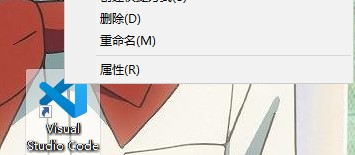
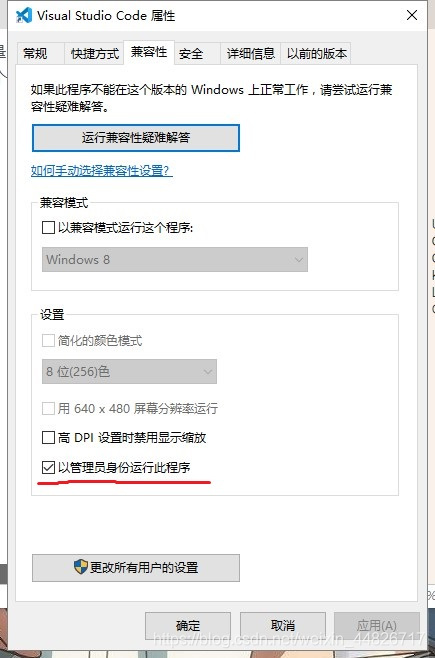
- 如果使用 cmd 可以运行,但是在 vscode 中出现这个错误,原因是没有使用管理员权限运行 vscode
pnpm 升级
shell
pnpm add -g pnpm
卸载 pnpm
在删除 pnpm CLI 之前,先删除所有由 pnpm 安装的全局包。
pnpm ls -g
删除全局包的两种方法
运行 pnpm rm -g <package>... 列出每个全局包。
运行 pnpm root -g 找到全局目录的位置并手动删除它。
移除 pnpm CL
如果是使用 npm 安装的 pnpm,那就应该使用 npm 卸载 pnpm
npm rm -g pnpm
如果不是,可以直接使用
pnpm rm -g pnpm